
Create a quote yourself
Write a quote for a request that came by phone or email, then price it and send it like any other.
When to use it
A customer calls or emails and asks for prices. Instead of retyping the request on your website, create the quote yourself. It gets the same editor, emails, accept button and order as a request from the website.
Create it
- Go to WooCommerce → Quotes and click Create quote.
- Enter the customer: first name and a valid email address are required, the proposal is sent there. Last name, phone, company and address are optional.
- Click Create quote and add products.
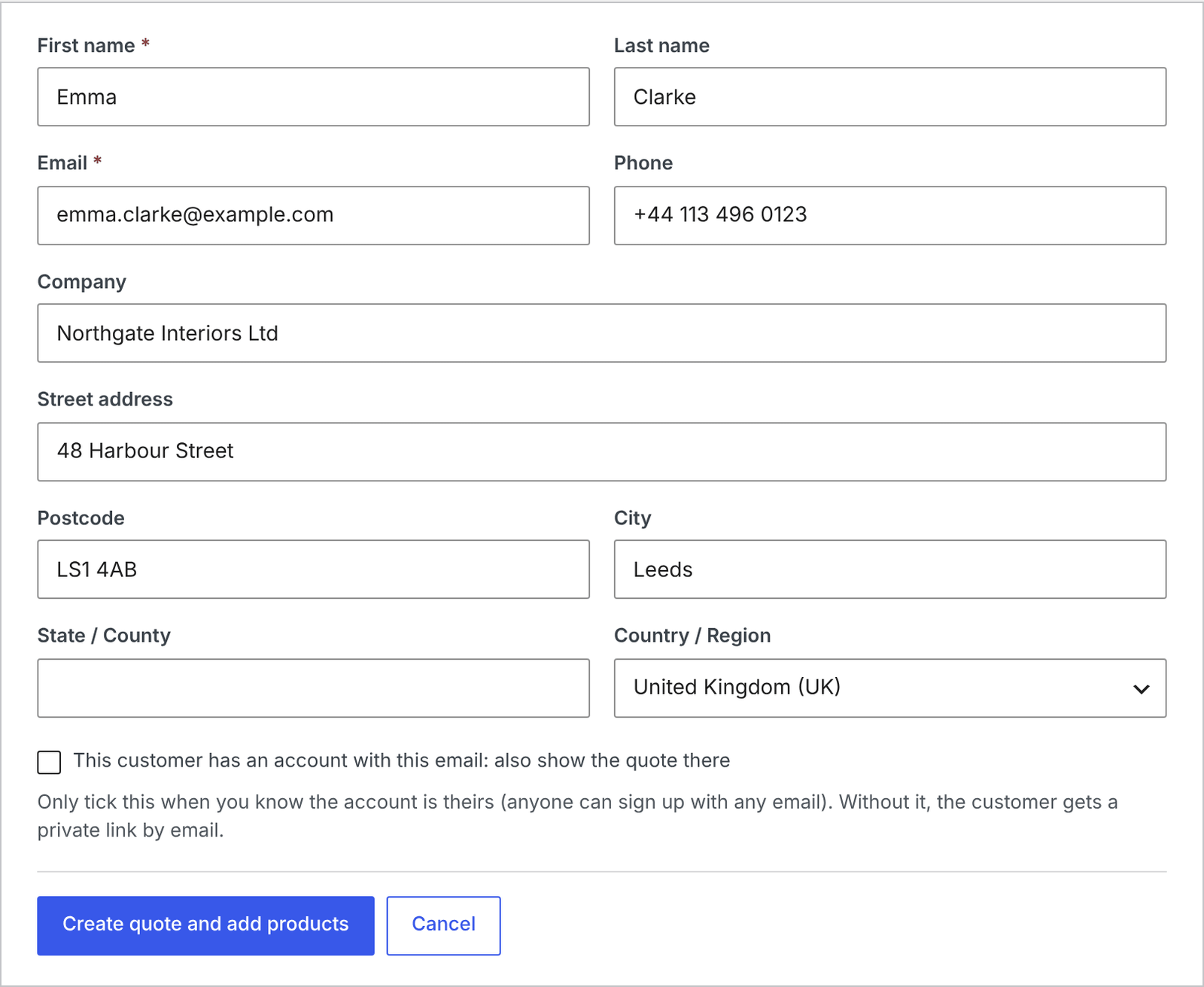
Nothing is emailed yet. You are now in the normal quote editor.
Price it and send it
Add the products with Add product, set your prices, and send the proposal. Everything works as described in Price a request and send the proposal.
The quote’s activity says Created by the shop. The customer gets no request received email, because they didn’t send a request.
The customer’s account
If the email address belongs to a customer account in your shop, you can tick This customer has an account with this email: also show the quote there. The quote then also appears under their My account → Quotes.
Careful Only tick it when you know the account is theirs: anyone can sign up with any email address. Without it, the customer gets a private link by email, as guests do.
Change the customer details
Until you send the proposal, Edit details in the Customer box lets you change who the quote is for. After sending, the details are fixed.
Who can create quotes
Anyone who can work on quotes: administrators, shop managers and the Quote Manager role.