
Automatic follow-ups
Reminders for proposals without an answer, before a quote ends, and for accepted orders that aren’t paid, with the timing you choose.
What it does
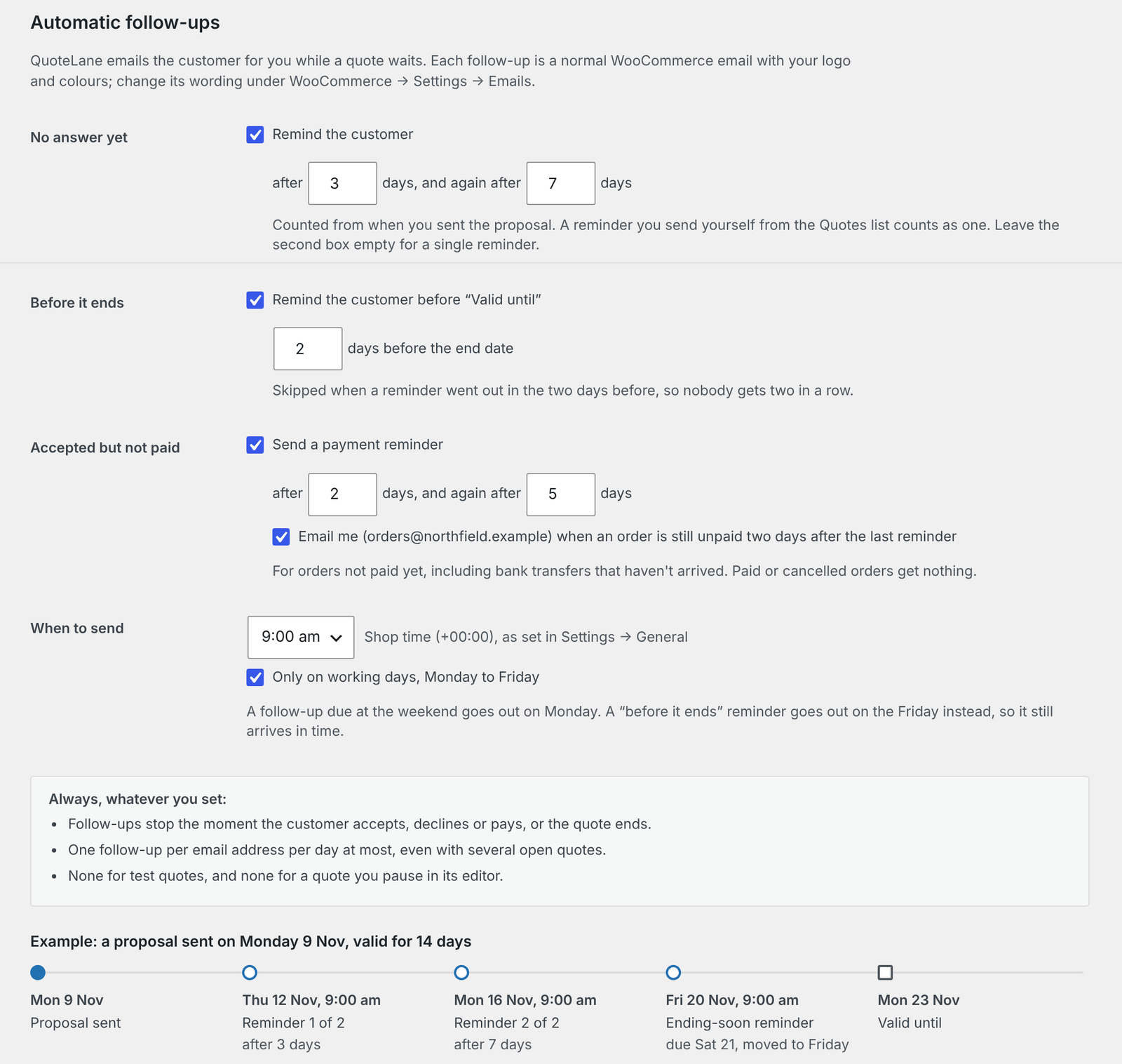
While a quote waits, QuoteLane Pro emails the customer for you, and stops as soon as they accept, decline or pay. Each follow-up is a normal WooCommerce email with your logo and colours.
Settings are under WooCommerce → Settings → Quotes → Pro → Automatic follow-ups.
The three kinds
| Follow-up | Default | Counted from |
|---|---|---|
| No answer yet: remind the customer | After 3 days, and again after 7 days | When you sent the proposal |
| Before it ends: remind the customer before Valid until | 2 days before the end date | The end date |
| Accepted but not paid: send a payment reminder | After 2 days, and again after 5 days | When the customer accepted |
Each one can be switched off with its checkbox. For a single reminder instead of two, leave the second box empty.
- A reminder you send yourself from the Quotes list counts as one of the No answer yet reminders.
- The Before it ends reminder is skipped when a reminder went out in the two days before, so nobody gets two in a row.
- Payment reminders cover orders not paid yet, including bank transfers that haven’t arrived. Paid or cancelled orders get nothing, and nothing is sent after the pay-by date: a customer who accepts close to the end may get fewer reminders.
Tell me when an order stays unpaid
Tick Email me when an order is still unpaid two days after the last reminder to get the order still unpaid email. It shows the order, the total, the pay-by date and the payment method. After that, nothing more is sent automatically.
When they are sent
- When to send: one time you choose, 09:00 by default, in your shop’s time zone from Settings → General.
- Only on working days, Monday to Friday (on by default): a follow-up due at the weekend goes out on Monday. A Before it ends reminder goes out on the Friday instead, so it still arrives in time.
Always, whatever you set
- Follow-ups stop the moment the customer accepts, declines or pays, or the quote ends.
- One follow-up per email address per day at most, even with several open quotes.
- None for test quotes, and none for a quote you pause.
On each quote
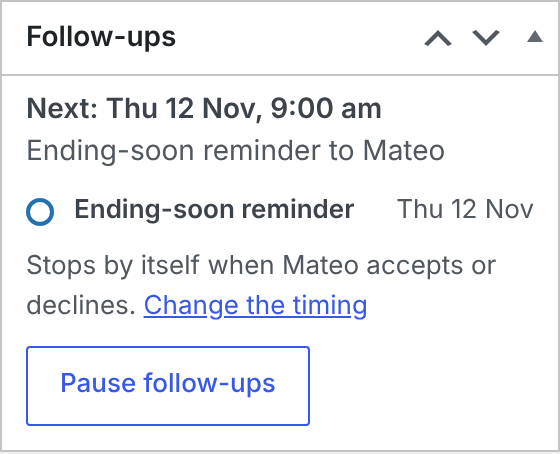
The quote editor has a Follow-ups box. It shows the next follow-up and its date, and each one that was sent, skipped or couldn’t be sent.
- Pause follow-ups stops them for this quote; nothing is sent until you click Resume follow-ups.
- Change the timing opens the follow-up settings.
Follow-ups start when you send the proposal.
Change the wording
Each follow-up is a WooCommerce email. Change its subject, heading and on or off under WooCommerce → Settings → Emails:
- Quote: reminder (customer) for the no-answer and before-it-ends reminders;
- Quote: payment reminder (customer) for payment reminders;
- Quote: order still unpaid (admin) for the email to you.
If one of them is switched off there, the Follow-ups box says so, and nothing of that kind goes out.
Note With viewed tracking, the no-answer reminder can be worded by whether the customer opened the quote.