
Install QuoteLane Pro and enter your licence
Install Pro next to the free plugin, activate your licence key, see which Pro features are on, and manage renewals.
What you need
- The free QuoteLane plugin, version 0.17 or newer, installed and active. Pro adds to it and doesn’t replace it.
- WooCommerce, active.
- Your purchase email from Freemius, the store that sells QuoteLane Pro for us. It holds your licence key and the download link.
Install Pro
- Open the purchase email and download the plugin’s .zip file. Keep it zipped: Safari may unzip downloads by itself, which WordPress can’t install.
- In WordPress, go to Plugins → Add Plugin → Upload Plugin.
- Choose the .zip file, click Install Now, then Activate Plugin.
Enter your licence key
Pro asks for the key after activation. Paste it from your purchase email.
If you skip that step, go to WooCommerce → Settings → Quotes → Pro and click Enter your licence key. The key is also in your customer portal.
Only a site administrator can enter or manage the licence. A shop manager sees the Pro settings, but not the licence.
Check that Pro is on
WooCommerce → Settings → Quotes → Pro shows the licence state at the top:
- Licence active: Pro features are on, and updates come through WordPress like any other plugin.
- No active licence: Pro features are off until a licence is activated. Your quotes and settings are kept.
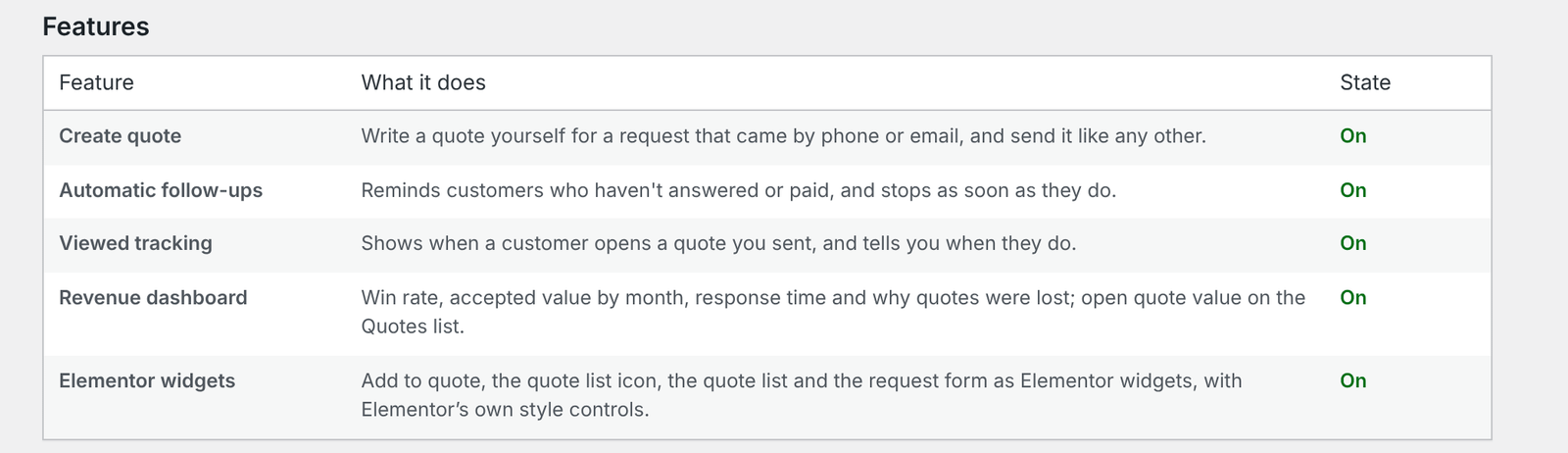
Below it, the Features table lists each Pro feature, what it does, and whether it is on.
Renewals and billing
With an active licence, the Pro settings show Licence and billing and the date it renews or ends. Your licence includes updates and support for one year and renews each year.
If a licence ends, the Pro features switch off, but nothing is deleted. Renew in the customer portal, then click Renew or enter a licence key in the Pro settings.
More than one site
Each site needs its own activation. A licence for 5 or 25 sites can be activated on that many sites; enter the same key on each.
On a multisite network, network-activate Pro or activate it on single sites, then enter the key on each site where Pro should run. Each site counts towards your licence’s number of sites.
What the licence sends to Freemius
Activating the key sends your site’s address, the Pro and Freemius versions, and later whether Pro is active, deactivated or uninstalled, so the licence is tied to your site and updates reach only sites you authorised. The activation screen also offers optional permissions, such as diagnostic information and the list of plugins and themes; you can switch those off there.
Nothing about your customers, products, prices or quotes is sent. Those stay in WordPress.
Updating Pro
Updates appear under Plugins and Dashboard → Updates, like other plugins. Update Pro in place.
Careful If you upload a new .zip by hand and end up with two copies of Pro, deactivate the older one first. Don’t delete a copy while the other is active.