
Who sees prices: rules explained
Rules decide which products can be quoted, for which customers and when, and whether the price and Add to cart stay visible.
Where the rules are
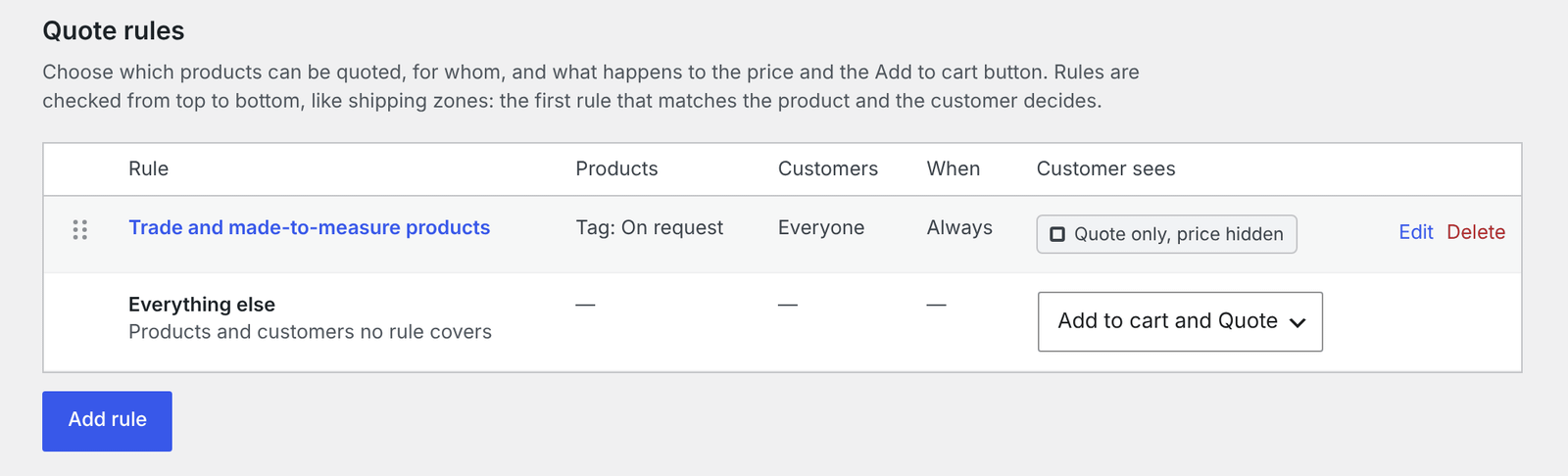
Go to WooCommerce → Settings → Quotes → Rules. A new shop starts with one rule, All products, which shows both Add to cart and the quote button everywhere.
What a rule is made of
Each rule answers four questions.
| Part | Your choices |
|---|---|
| Products | All products, products in categories (subcategories included), products with tags, or selected products. You can add exceptions. |
| Customers | Everyone, logged-out visitors, logged-in customers, or customers with certain roles. |
| When | Always, only when out of stock, only when the product has no price, or when out of stock or without a price. |
| What the customer sees | Add to cart and Request a quote · Request a quote instead of Add to cart · Request a quote, price hidden · Normal shop, no quote button |
With price hidden, customers see your text instead of the price (“Price on request” if you leave it empty). The price is also kept out of search engines and the Store API, so it can’t be read another way.
The order matters
Rules are checked from top to bottom, like WooCommerce’s shipping zones. The first rule that matches the product and the customer decides; the rules below it are skipped. Drag the handles to change the order, or focus a handle and use the arrow keys.
Put narrow rules (one category, one role) above broad ones (all products).
Everything else
The last row of the list, Everything else, decides for products and customers no rule covers. Choose Normal shop, no quote or Add to cart and Quote there.
Check a product
The Check a product box on the rules page shows what a guest, or a customer with a given role, sees for any product, and which rule decides. Every product has the same check in its own Quotes tab, in the product data box when you edit the product.
That tab also has Never offer quotes: this product always sells normally, whatever the rules say.
Variations and stock
Variations are checked one by one. With a rule set to only when out of stock, a sold-out size can be quoted while the other sizes go into the cart as usual.